Editorial verdict
Our 30-second take on TedsWoodworking
Bottom line
TedsWoodworking is an online plan library for people who like to build things from written plans. The seller says it holds about 16,000 plans, with cut lists and materials lists, and adds new ones each month. The seller lists $67, one payment, for lifetime access to the plan library (seller's terms). A 60-day money-back guarantee backs the order. Check local building rules before any structure, and follow each tool's manual.
Why buyers choose it
- A large library that you search by category and skill level, per the seller
- Cut lists and materials lists on each plan, so you know what to buy before you cut
- PDF and DWG formats, with a DWG viewer included as a bonus
- One payment of $67 and a 60-day money-back guarantee
Best for
Hobbyists who want one searchable place for woodworking plans in PDF and DWG, and who already have or are willing to buy the basic tools the plans call for.
At a glance
- From $67 per purchase
- 60-day money-back guarantee
- $67, one payment
- PDF and DWG plans, per the seller
- Cut lists and materials lists
- 60-day money-back guarantee
What TedsWoodworking is
TedsWoodworking is a digital library of woodworking designs. You sign in to a members area, run a search, and download the design you want as a PDF or a DWG file. The listed price is $67, paid once, and the purchase opens the library along with its add-ons.
Anyone who has bought a single project guide and found it did not fit the shop will recognise the problem this solves. Here the catalogue is built around searching: you narrow by subject, check the difficulty, and open the design that matches the space and tools you have.
What follows covers what the vendor says is inside, the one charge, how the guarantee works, where to order safely and the local rules that matter before you build anything structural.
View the order page for TedsWoodworking
A single $67 charge, the add-ons and a 60-day refund window, all shown before payment.
Start Searching DesignsCharged through ClickBank · keep the confirmation message
Why a searchable catalogue helps
Most builders end up with a stack of plans that never got used. A catalogue turns that pile into something you can query.
- Subject filters. Furniture, storage, outdoor pieces, kitchen items, children’s projects and workshop helpers.
- Difficulty tags. Beginner, intermediate and expert, as the vendor applies them.
- Shopping lists first. Each design lists its cuts and materials before any sawing starts.
- Two file types. Print-ready PDFs and editable DWG drawings.
Our longer take on the product sits in the review, and the what-is walkthrough steps through a single design from start to finish.
What the vendor says the library contains
The vendor’s count is about 16,000 designs. We have not checked that figure. The categories it names run from furniture and storage to shelters, kitchen pieces and tool jigs. According to the listing, every design carries build steps, a precise cut list, a complete materials list and drawings with exploded views.
Our own read is that the structure is sound: the four parts together are what a builder needs to go from a sketch to a shopping trip. The inventory page breaks the contents down further.
Who this library fits
The product is pitched at home makers and hobbyists, and that matches its shape. It is a reasonable pick when:
- You like planning before cutting. Cut lists and materials lists remove guesswork at the lumber yard.
- You want many options in one place. A single purchase covers far more ground than one book.
- You already own the basics, or plan to buy them. The vendor names a table saw, a drill, clamps and a sander as the usual kit.
- Either file format suits your workflow. Print at home, or open the CAD drawings.
It is a weaker match if you want a finished item delivered, or if you have neither the tools nor the room to build. The benefits page sets out the upsides and the drawbacks in more detail.
Look at a real design before you commit
Open a design, read its cut list and check the materials before you buy anything.
Browse the DesignsInstant online access after checkout
The $67 charge
The order page lists one option: $67, paid once. The vendor’s own wording describes the purchase as lifetime access to the plan library (seller’s terms). The total on the checkout screen is the figure to trust, so compare it with $67 before you confirm.
TedsWoodworking official prices
The full plan library
The plan library, one payment
Instant member access
$67/purchase
$67 total
- An online library of woodworking plans, which the seller says holds about 16,000 plans
- Cut lists, materials lists and exploded-view drawings on each plan, per the seller
- Plans in PDF and DWG, with the DWG/CAD Plan Viewer listed as a bonus
- New plans added monthly and a custom plan request form, per the seller
- One payment of $67, with a 60-day money-back guarantee

Prices as published on the official order page (checked November 24, 2026). Tax and the final total are shown at checkout.
| Item | What the page shows |
|---|---|
| Price | $67, paid once |
| Access | Members area, immediate after payment |
| File types | PDF and DWG designs, with a DWG viewer as an add-on |
| Refund window | 60 days |
| Payment processor | ClickBank |
The price page walks through each line, and the price article condenses the same figures.
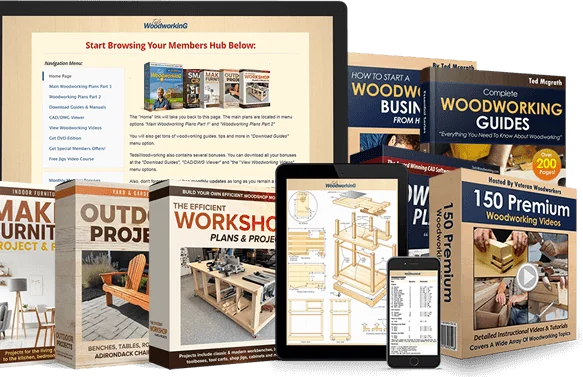
Add-ons with the purchase
The vendor lists three additions. None carries a separate price on the order we checked.
Free bonuses
Get all 3 bonuses free with your TedsWoodworking order
Order today and these digital bonuses come with your purchase, at no extra cost.
Bonus 1

DWG/CAD Plan Viewer
Software, per the seller, for opening DWG plans, and for editing or creating plans. You need it to open the DWG files in the library.
Bonus 2

150 Premium Videos
Over 150 woodworking videos with step-by-step instruction, per the seller.
Bonus 3

Complete Woodworking Guides
Over 200 pages on hand tools, dovetail joints and more, per the seller.
Bonuses Included free with your purchase
Get it with the bonuses- DWG/CAD Plan Viewer. Opens the drafting files and, per the vendor, can also edit or create designs.
- 150 Premium Videos. More than 150 woodworking lessons that demonstrate each step on camera.
- Complete Woodworking Guides. Over 200 pages covering hand tools, dovetail joints and more.
The add-ons article explains where each of them earns its keep, and the benefits page links them to specific builds.
Claim the library with all three add-ons
One $67 payment covers the designs, the viewer, the videos and the guides.
Order the LibrarySingle payment · 60-day refund window
60-day money-back guarantee on every TedsWoodworking order
Every purchase is backed by a 60-day money-back guarantee. If the library does not meet your needs, you can ask for the money back.
To make the request:
- Hold onto the confirmation message. It holds the order details the vendor will ask for.
- Write through the vendor’s support page. Give your order details; the vendor says the refund arrives within 48 hours.
- Fall back on ClickBank’s order desk. ClickBank handles the sale, and its order support is reachable at clkbank.com.
What you receive after payment
The library itself is digital. Once the order clears, the sequence looks like this:
- Sign in to the members area from a phone, tablet or computer.
- Search and download. Open PDFs in a reader, or DWG files in the viewer.
- Install the viewer. It is needed for the CAD drawings only.
- Use the videos and guides as a companion to the designs.
- Watch for monthly additions. The vendor says new designs appear each month.
PDF designs open in any free reader and print on an ordinary printer. Most designs carry both imperial and metric measures.
Is TedsWoodworking legitimate?
Here is what we could check. ClickBank is the payment processor, which gives the transaction an established intermediary. The vendor’s support page lists a business address in Austin, Texas, and a 60-day refund promise. The order page shows the price before any card details are entered.
What we could not confirm is the design count, the video count and the claim that designs are checked before they arrive. Those are the vendor’s statements. The legitimacy article lays out the checks we ran.
Verify the price on the order page
Confirm the $67 total and the refund promise before entering payment details.
Go to the Order PagePayment handled by ClickBank
Where to order
Order through the page our buttons open. We do not resell the library, and copies from marketplaces or file-sharing sites are not the members library.
- Click a button on this site. It leads to the vendor’s order page.
- Read the total. It should show $67, paid once.
- Pay in ClickBank’s checkout. That is the secure step for card details.
- Keep the confirmation message. It holds the order details for support.
- Log in to the members area. Begin with a design that matches your tools.
The buying guide covers each screen, and the article on where to buy adds background.
Safety, tools and local rules
Digital designs still produce physical structures. Keep these points front of mind:
- Building codes. Designs are not made to any code. Check with your local building office before a shed, deck, bunk bed or similar.
- Power tools. Read each tool’s manual, and wear eye and hearing protection.
- Difficulty labels. A beginner tag does not promise a safe build. Read the full design before the first cut.
- File readers. PDFs need a free reader; DWG files need the viewer.
The safety page expands on each point.
Plan a build from a complete cut list
Each design lists its parts and materials, so you can shop once and cut once.
Open the LibraryOne $67 payment · ClickBank is the retailer
How it stacks up against alternatives
A library and a single book answer different needs. The library gives you breadth and search. A book gives you one project in depth. Free designs online are handy, but the lists, formats and quality vary from one source to the next.
The comparison page sets the library against those options, and the article on free plans takes the question further.
Our editorial rating
We give TedsWoodworking 3.7 out of 5. That is our own assessment, not a score from buyers. It credits the breadth of the library and the modest price, and it discounts the design count and other claims we could not check. The full review shows the reasoning area by area.
Our final take
TedsWoodworking offers a large, searchable set of woodworking designs with cut lists, materials lists, two file formats and three add-ons, for $67 paid once, with a 60-day refund window. The unverified claims deserve a skeptical eye, the local rules need checking before any structure, and the power tools need real care. If those conditions suit your workshop, the library is worth opening.
Ready to open the library?
$67 paid once, the designs, the three add-ons and a 60-day refund window.
Get TedsWoodworking for $67Keep the confirmation message · ClickBank order support at clkbank.com