
If you keep asking what is Teds Woodworking, the short answer is a members-area library of woodworking plans, sold for one payment. The seller says the library holds about 16,000 plans, and each one arrives as files you open on a phone, tablet or computer after you sign in. This walkthrough takes the product apart one step at a time, so you know what you would be ordering before the checkout page opens.
See the library from the inside
Plans, a viewer, videos and guides for one payment of $67.
Explore the Plans NowClickBank is the retailer for this order
The idea behind the library
Instead of buying one book for each project, you draw from a single catalogue. The seller describes it as fully searchable, so a bookcase, a potting bench or a set of kitchen shelves can each be located without flipping through pages. Every entry is its own set of files. That means one design can be printed for the workshop while another stays open on a laptop.
The seller’s figure is about 16,000 plans. We pass that number along as the seller’s claim, since it is not something we have counted.
What is Teds Woodworking, in plain terms
Put simply, the product is a members-area catalogue of woodworking plans. You are not buying a finished chair or a box of parts. You are buying access to plans that describe how to make furniture, storage, outdoor pieces and workshop helpers, along with the bonus viewer and add-ons bundled with the order. Think of it as a library card for a drafting room, where the drafts arrive as files and the cutting is left to you.
That distinction matters. A plan tells you what to buy, how to cut it and how the pieces meet. It does not supply the lumber, the hardware or the tools, and it does not check your work. The seller’s support notes say the builder is responsible for local safety codes, so the time you spend on reading the plan should be matched by time spent on shopping and on rules where you live.
The TedsWoodworking hub lays out the same product in a short table, which is handy before you read the longer walkthrough below.
Step one: order and sign in
Payment comes first. The seller lists $67, one payment, for lifetime access to the plan library (seller’s terms). After the order clears, you sign in to the members area with the login the seller provides. The area runs on a phone, a tablet or a computer, so the same account follows you from the garage to the sofa.
Step two: search and narrow the list
Search runs on keywords, and category filters let you sort by the type of thing you want to make. Difficulty is a separate control. The seller sorts plans into beginner, intermediate and expert levels, and says most of the library sits in the beginner group. Those labels help you pick a project that suits your confidence, but they describe difficulty only.
Because plans cannot be bought one at a time, the search tool is there to help you find the right design inside the library you already have access to.
Step three: read a plan
Open a plan and, in the seller’s description, you should find four parts: step-by-step instructions, a cut list that names each piece, a materials list for the shopping trip, and drawings from several angles with exploded views that show how the parts fit together. Most plans use imperial and metric measurements, so you can work from whichever ruler hangs in your shop.
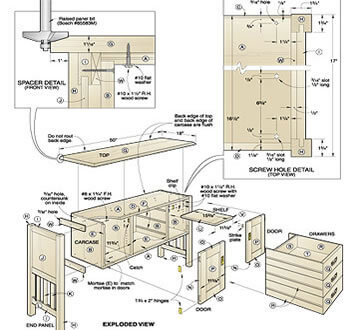
The drawing above is an illustration of the sheet style. It is not a photograph of a finished piece.
Pick a plan before you buy lumber
Search the catalogue, then open the drawing that matches your shop.
Browse the CatalogueOne payment of $67 · checkout runs through ClickBank
Step four: download, print or open
Files come in two formats. PDF plans open in any free reader and print on a home printer. DWG plans need the DWG/CAD Plan Viewer that is bundled with the order, and the seller says that viewer can also edit and create drawings. You can print the cut list and keep the drawing open on a larger screen, which helps when a drawing carries a lot of detail.
The tools list is the next thing to check. Per the seller, most plans expect a table saw, a drill, clamps and a sander. If a plan calls for something else, the list on that plan will say so.
What keeps arriving
New plans are added monthly, and the seller puts the pace at five to eight projects a month. Members also get a custom request form inside the members area, where you can ask for a plan that is not in the catalogue yet. The seller says that form carries no extra charge.
Keep the library growing with you
New plans arrive each month, and the custom form stays open to members.
Start With the LibrarySingle payment of $67 · keep your confirmation email
Reading one plan from start to finish
Take a bookcase plan as an example. You open the file, read the materials list and compare it with what your lumber yard stocks. Next comes the cut list, which names each piece and its size, and you can mark those pieces on a board before any saw starts. The exploded-view drawing then shows how the sides, shelves and back fit together, so the assembly order is clear before any glue goes on. The step-by-step instructions link those drawings to the actions you take at the bench.
This is an illustration of how a plan is read, not a record of anyone’s build. Your own sequence will depend on the plan you open, the tools you own and the materials you buy.
What the library does not do
It does not finish furniture for you, and it does not deliver a built piece to your door. It also does not replace a local check of codes, and it does not teach the use of power tools from scratch. A beginner plan can still call for equipment you have never used, so read the tools list first and plan your practice on scrap wood.
Searching the catalogue in practice
A good search starts with a short list of terms. Type the object you have in mind, such as a shelf, a bench or a planter, then add a category filter to narrow the results. Set the skill level to match your confidence, and sort by difficulty if you want the simplest options first. Each filter removes results you do not need, so the list that remains is closer to what you can build with the tools you own.
Where it suits, and where it stops
The library fits people who already own basic power tools and expect to build several projects over the coming year. A first-time builder can begin with a beginner plan and move up as skills grow. It is less suitable if you want a finished piece delivered to your door, or if you have no space to store a workshop. It also does not replace the rules that apply where you live.
For the complete product facts in one place, the TedsWoodworking hub lists them side by side, and the benefits page walks through the features in order. If you want a second opinion on the library, the full review covers the strengths and weak spots.
Ready to see the whole catalogue?
One payment of $67 opens the plans, the viewer, the videos and the guides.
Get Instant Library AccessClickBank is the retailer · confirm the total at checkout
Before you go, check the PDF guide for the file side of the library, and the bonus rundown for the three add-ons that come with the order. The TedsWoodworking hub is the place to return to once you have read both.


