
A members-area plan library, sold for a single $67 payment: that is the product this Teds Woodworking review examines. According to the seller, the catalogue numbers about 16,000 plans, each supplied with cut lists, materials lists and exploded-view drawings. Below we cover the contents, the readers it suits, the weak spots and our 3.7 out of 5 rating.
Look inside the plan library
One payment of $67 for the plans, the viewer, the videos and the guides.
Open the Plan LibraryClickBank processes the purchase as retailer
Teds Woodworking review: what the library is
Picture a digital shelf. Once the order clears, you log into a members area on a phone, tablet or laptop, search for what you need and download it. Designs arrive as PDF files that print well at home, and as DWG drawings for CAD programs. The seller markets the collection as fully searchable, so a keyword lookup sits alongside a set of filters.
Each design is its own file rather than a chapter in a bound book. That means you pick the one that fits your room, your kit and your schedule. The TedsWoodworking hub summarises the same contents in a shorter format, and the sections below give our reading of them.
How the search and skill labels work
The seller offers three ways to narrow results: keywords, category filters and a skill level. Categories range from furniture and storage to outdoor pieces, kitchen items, children’s projects and workshop helpers. Results can also be ordered by difficulty, which helps when you want something achievable for a first build.
Each design wears a difficulty tag. Based on the seller’s own description, most are for beginners, with the remainder spread across intermediate and a smaller group of expert projects. Read that tag as a rough gauge of demand, not as a guarantee of the result you end up with.
New designs appear at a pace the seller puts at five to eight a month. Members also get a custom request form, which the seller says carries no added cost. Even so, use the search first, since a catalogue this large rewards narrowing down before you draft a shopping list.
What each plan includes
The seller’s list for every design runs to step-by-step instructions, a precise cut list, a complete materials list and multi-angle drawings with exploded views. The cut list names each piece and its size, while the materials list names what to buy. Units are imperial and metric on most designs, so you can match the sheet to the measuring system your lumber yard uses.
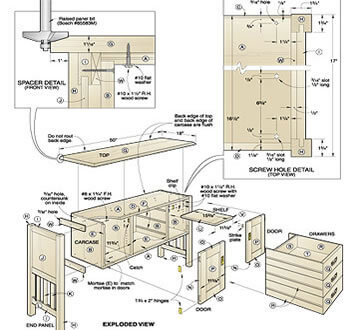
The sheet above is an illustrative drawing, not a photo of a finished piece, and it stands in for no single design in the library.
Formats, tools and the viewer
PDF designs open in any free reader and can be printed at home. DWG designs require the bonus viewer, which comes with the order. Per the seller, that viewer also edits and creates drawings, so it does more than open files.
The tools question deserves attention before any lumber is bought. Per the seller, a typical design expects a table saw, a drill, clamps and a sander. If a particular design asks for a router or a planer, the tools list on that design says so, and you should weigh that before you buy stock.
After checkout
After payment you sign in, filter the catalogue, download a design and either print it or open it in the viewer. Store your confirmation email somewhere safe. Its order details are what you will need if you later write to the seller about a refund.
Who the library suits
We see three groups who should find the library useful:
- Hobby builders with a workshop or garage. A searchable catalogue shortens the path from an idea to a shopping list.
- Planners who want materials first. Cut and materials lists arrive before any sawing starts.
- People with a queue of projects. One purchase covers many builds, so the value grows with use.
It suits less well if you want something finished and delivered, or if you have neither the tools nor the room. Designs are not sold singly, so the library only makes sense when you expect to draw on it repeatedly.
Pick a project from the catalogue
Narrow by category and difficulty, then open the design that fits your kit.
Browse the PlansOne payment of $67 · checkout by ClickBank
Price and what the order includes
On the seller’s terms, the charge is $67 once, and the seller describes the access as lifetime. The three bonuses ride along with that order. A DVD or USB version can be selected at checkout, but we did not see its price on the pages we read, so no figure for it appears in this review.
| Item | What the seller states |
|---|---|
| Price | $67, one payment |
| Formats | PDF for printing, DWG for CAD |
| Add-ons | DWG/CAD Plan Viewer, 150 Premium Videos, Complete Woodworking Guides |
| Refund | 60-day money-back guarantee |
The price page walks through the charge line by line.
Our 3.7 out of 5 score
Our editorial rating is 3.7 out of 5, and it is not a score drawn from buyers. It is the average of six marks, each out of five:
- Plan content: 4. The catalogue is broad, and the parts list per design is consistent by the seller’s account.
- Evidence: 3. Plan numbers and monthly additions come from the seller and remain unverified by us.
- Transparency: 3.5. A business address and a support form are named, but no phone line or email address is printed.
- Value: 4.5. One $67 payment unlocks a large catalogue, two formats and three add-ons.
- Guarantee: 4. Money-back cover for 60 days, with a 48-hour refund target stated by the seller.
- Checkout clarity: 3. The order flow only reveals its details once the ClickBank button is pressed.
Value leads because the price is modest for what sits in the catalogue. Evidence trails because the headline numbers are the seller’s own. Checkout clarity scores lowest, which seems fair given how little the order flow shows before you commit.
Honest limits to weigh
- The design count belongs to the seller. We did not tally the library.
- Designs are not engineered to any building code.
- DWG drawings cannot be opened without the bundled viewer.
- Single designs cannot be bought on their own.
Weigh the limits, then choose
If the trade-offs suit your workshop, the order page is the next click.
Start With a Plan TodaySingle payment of $67 · keep your confirmation email
Our verdict
Taken together, Teds Woodworking delivers a broad, searchable store of woodworking designs, with cut lists, materials lists and two file types, for one $67 payment. Our 3.7 out of 5 credits the value and range, and marks down the claims we cannot check along with a checkout that hides its details until you start.
If you already have the basic tools, expect to build several projects and want materials lists before you buy lumber, the library merits a serious look. The what-is walkthrough shows the flow step by step, the PDF guide explains the file side, and the legitimacy check covers the seller and the payment route. The TedsWoodworking hub gathers everything else in one place.
Ready to open the library?
$67 in one payment, with the designs, the viewer, the videos and the guides.
Get the Plan Library for $67ClickBank is the retailer · keep your confirmation email


